RECENTLY CHECKED
All projects →
CAIBI ASSESSMENT

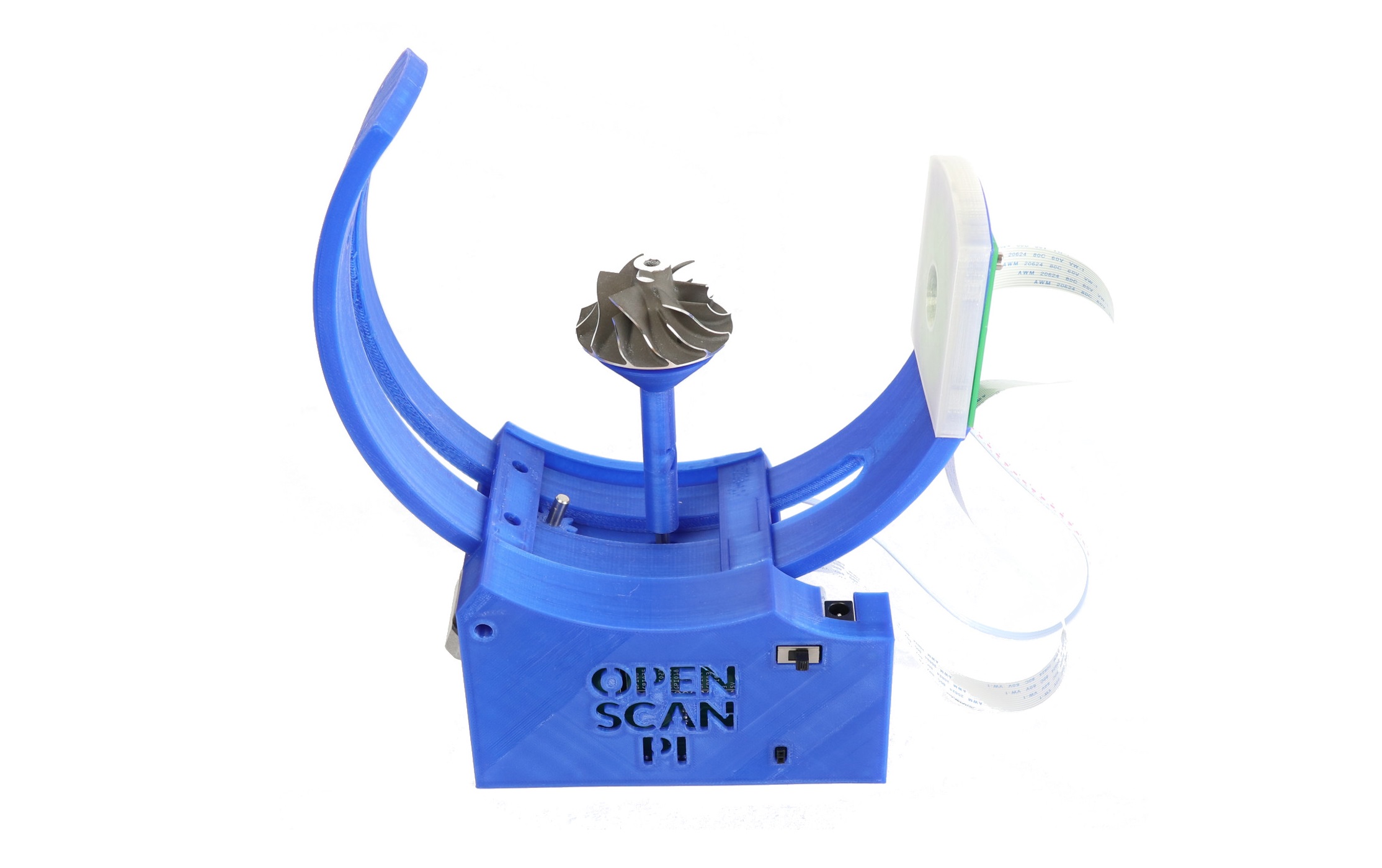
OpenScan Mini

CAIBI VERDICTBUILD IT

A compact open-source photogrammetry scanner that rotates small objects through controlled camera positions to create detailed 3D models.

Build or buy?

Compare the documented build with the purchase reference.

Build it yourself

Configuration prices£199 / £331Choose configuration to budgetBasic kit / fuller kit; check camera and computer inclusions
Time
Not published
Difficulty
3/5
Physical processes
3D printer · Raspberry Pi · Photography
See build requirements →

Purchase reference

Buy price reference£799Revopoint MINI 2Recorded 5 Sep 2026

Check the source for the exact model, availability and what is included.

Check comparison evidence →
Prices are not directly comparable
What the prices cover

Current OpenScan kit pricing already recorded in the assessment.

Includes: Selected OpenScan kit route.

Not included: Camera/computer items not included in selected kit; Shipping; Photogrammetry workstation.

Build evidence recorded 4 Sep 2026. Currency conversions are approximate.

Revopoint MINI 2 is a useful small-object scanner comparison, but it offers different optics, software and metrology claims. The difference is therefore a cash reference, not an equivalence claim.

UK purchase/source reference ↗US purchase/source reference ↗
BUILD AT A GLANCE

Source view and main parts

Check the source ↗
OpenScan MiniOpenScan Mini · OpenScan ↗
PHYSICAL BUILD7 key parts or groups
No.Source specification
013D printed OpenScan Mini frame
02Raspberry Pi 3B+ or 4 with microSD card
03OpenScan Pi Shield and two stepper drivers
04Two NEMA 17 stepper motors
05Arducam IMX519 autofocus camera
06Ring light and cross-polarizer module
0712 V power supply
Full source specifications
  1. 3D printed OpenScan Mini frame, rotor, gears, backplate and object holders
  2. Raspberry Pi 3B+ or 4 with microSD card
  3. OpenScan Pi Shield and two stepper drivers
  4. Two NEMA 17 stepper motors, one higher-torque and one lower-torque unit
  5. Arducam IMX519 autofocus camera, with supported Pi Camera alternatives
  6. Ring light and cross-polarizer module
  7. 12 V power supply, ribbon cable, screws and nylon camera hardware

TOOLS / PROCESSES3 involved
  • 3D printer
  • Raspberry Pi
  • Photography
The real-world workYOU STILL HAVE TOThe real-world work
  • Print parts
  • Assemble motors and camera
  • Prepare objects
  • Capture scans
  • Validate dimensions
THE BUILD SEQUENCE

How it comes together

1Preparation

  1. Choose Mini V1 or a community V2 route

    For the most supported path, use the maintained Mini V1 documentation and matching parts. OpenScan explicitly warns that the evolving designs and electronics are not all cross-compatible.

    YOU
  2. Print the scanner structure

    Print the frame, rotor, gears, backplate and holders. The Mini is designed to fit a standard 20 x 20 cm print bed.

    YOU

2Build and assembly

  1. Assemble the motion system

    Install the two NEMA 17 motors, rotor gearing and object holder so the object can rotate and tilt through repeatable camera positions.

    YOU
  2. Install camera, lighting and electronics

    Fit the Raspberry Pi, shield, camera, ring light and polarizer module. The Arducam IMX519 autofocus module is the current reference camera in the V1 documentation.

    YOU

3Configure and test

  1. Bring up the browser-controlled scanner

    Install the OpenScan firmware and verify local browser control, motors, camera focus and lighting before attempting a detailed scan.

    AI + YOU
  2. Capture, process and validate a known object

    Prepare a suitable surface, capture a full image set, process it using OpenScan Cloud or local photogrammetry software, then compare the mesh with the physical object before trusting dimensional results.

    AI + YOU

Benchmark this project

Use the OpenScan Mini prompt. Compare what different models deliver, then add what happened when you tried it.

Try this benchmark
View the project prompt

CAIBI adaptation · Prompt 1.0 · Project source

Open and copy prompt →

Benchmark results 0

No reviewed results yet for OpenScan Mini. Add the first result →

AI IN THIS PROJECT

Get AI help on this build

CAIBI · AI CAN HELP

AI can help with

  • Scan workflow planning
  • Image and mesh troubleshooting
  • CAD cleanup guidance
  • Configuration help
CAIBI · AI CAN'T DO

You still need to

  • Print parts
  • Assemble motors and camera
  • Prepare objects
  • Capture scans
  • Validate dimensions
Original source AI use and prompts
SOURCEThe original project does not publish an AI prompt

The prompts below are CAIBI helpers for this build. They are not presented as instructions from the creator.

CAIBI STARTING PROMPTS

Copy a prompt for this build

Each prompt tells AI to keep the original project source as the reference and to flag anything you must verify on the real build.

Ways to take it further
AFTER THE FIRST BUILD

Ways to take it further

Community Mini V2 frameDifferent supported Pi cameraLocal photogrammetry instead of OpenScan CloudCustom object holdersAutomated scan presetsReuse the electronics in OpenScan Classic
More routes and resources
OTHER WAYS TO GET THERE

You do not have to follow one route.

REVIEWED RESOURCES

Useful places beyond the main source

SOURCE · CAIBI · BUILDERS

What supports the verdict

SOURCEOpenScan

OpenScan currently maintains Mini V1 hardware kits and documentation. Community Mini V2 designs also exist, but the project warns that parts are not automatically cross-compatible.

Open source ↗
CAIBIBUILD IT

It turns physical objects into reusable digital geometry with an unusually accessible open hardware route. AI can help with scan preparation, photogrammetry workflow, cleanup and adapting the printable frame.

Evidence: Strong

Leave a build review
HAVE YOU MADE THIS?

Leave a build review.

First-hand evidence improves the assessment
What we want to know

What happened when you actually tried to make it.

  • Did it work?
  • Actual time and cost
  • What did you change?
  • What was harder than the source suggested?
  • Would you build it again?