RECENTLY CHECKED
All projects →
CAIBI ASSESSMENT

Bird Feeder Species Camera

CAIBI VERDICTBUY INSTEAD

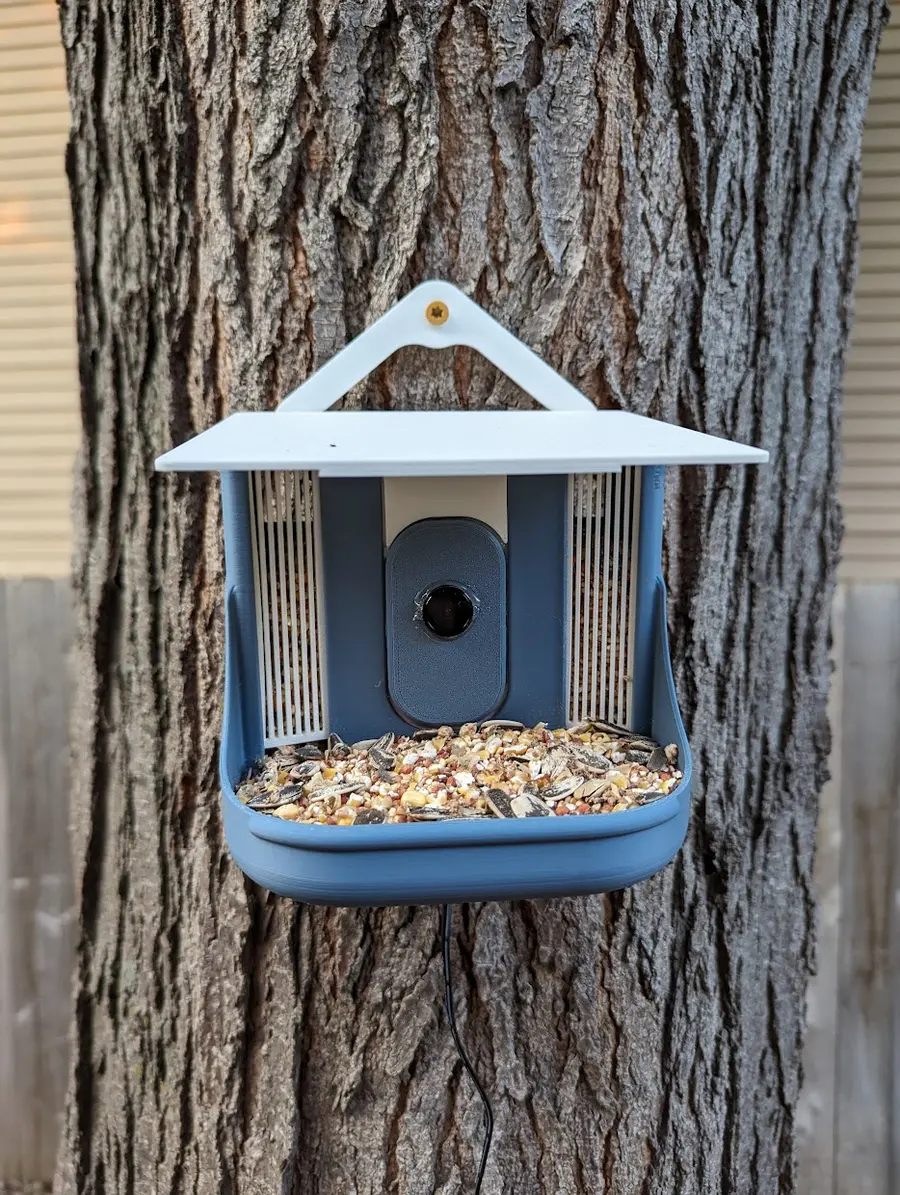
A 3D-printed feeder with a Raspberry Pi fisheye camera that streams to Frigate on a separate always-on computer, where a local bird classifier names the species of each visitor.

Build or buy?

Compare the documented build with the purchase reference.

Build it yourself

Known parts cost£90–£110Build total not establishedFeeder-end parts only: Pi Zero 2 W, fisheye camera, cable, supply, microSD, one spool of PETG, with an allowance for lens cover and fixings. Excludes the always-on Frigate computer, printer ownership and any outdoor electrical work.
Time
Multi-stage: printing plus Frigate setup (no source time)
Difficulty
3/5
Physical processes
3D printer or print service (PETG suggested for outdoor parts) · Computer to flash the microSD card and configure the Pi · Always-on Docker host for Frigate, MQTT and the web interface · Hot glue or outdoor-rated adhesive for the lens cover · Drill and fixings for the mounting position
See build requirements →

Purchase reference

Buy price reference£79.99–£155.98Birdfy Feeder Rookie, with Birdfy Membership Plus for unlimited AI recognitionRecorded 24 Sep 2026

Check the source for the exact model, availability and what is included.

Check comparison evidence →
Prices are not directly comparable
What the prices cover

Current prices for the source-specified Pi, camera, cable, supply, card and one spool of filament. The low end is the listed parts; the high end allows for a lens cover, adhesive, fixings and outdoor cable management that the source does not price. The Raspberry Pi Zero 2 W was out of stock at The Pi Hut, Pimoroni, Adafruit and SparkFun on 24 Sep 2026; PiShop.us listed it with a one-per-order limit.

Includes: Raspberry Pi Zero 2 W; Waveshare 5MP Camera (G) with 160° fisheye lens; Pi Zero camera cable; Official 12.5W micro USB power supply; 32GB microSD card; 1 kg PETG filament; Allowance for lens cover, adhesive and fixings (high end only).

Not included: Always-on computer for Frigate (for example a Beelink EQ14 N150 mini PC, $385 pre-order on bee-link.com on 24 Sep 2026; no GBP price verified); 3D printer ownership or print service; Outdoor socket or any fixed electrical work; Bird seed, pole or bracket; Shipping.

Build evidence recorded 24 Sep 2026. Currency conversions are approximate.

The closest bought equivalent is the Birdfy Feeder Rookie: one camera, a small feeder and AI species recognition. It costs £79.99 in the UK and $79.99 in the US. Its free tier allows 10 AI recognitions a day; unlimited recognition needs Birdfy Membership Plus at £75.99 or $79.99 a year, and the US store sells the Rookie with a first year of Plus for $139.99. That puts the UK first year at £155.98. Bird Buddy's Pro was £250 at John Lewis and the US Pro Solar was $189 (sale price, regular $339). Bird Buddy's free plan includes species ID, and its automatic AI+ recognition needs Individual Premium at $69.99 a year; no UK Premium price could be checked because Bird Buddy's European shop was offline. Birdfy is Netvue's bird-camera brand, and netvue.com lists the same range at higher prices. CAIBI does not claim a difference: the build's £90–£110 / $111–$135 covers only the feeder end and needs an always-on Frigate computer, while the bought feeders run on battery and solar and include a warranty and app. The build carries no subscription.

UK purchase/source reference ↗UK purchase/source reference ↗US purchase/source reference ↗US purchase/source reference ↗US purchase/source reference ↗UK purchase/source reference ↗US purchase/source reference ↗US purchase/source reference ↗


BUILD AT A GLANCE

Source view and main parts

Check the source ↗
PHYSICAL BUILD8 key parts or groups
No.Source specification
01Raspberry Pi Zero 2 W (the creator used a Pi 3B
02Waveshare 5MP Camera for Raspberry Pi (G)
03Raspberry Pi Zero camera cable (22-pin to 15-pin)
04Official Raspberry Pi 12.5W micro USB power supply
0532GB microSD card
06Printed feeder body
07Clear protective lens cover
08Separate always-on computer running Frigate
Full source specifications
  1. Raspberry Pi Zero 2 W (the creator used a Pi 3B; a Pi Zero W is suggested as possibly workable)
  2. Waveshare 5MP Camera for Raspberry Pi (G), OV5647 sensor with 160° fisheye lens, which the printed front plate is sized for
  3. Raspberry Pi Zero camera cable (22-pin to 15-pin)
  4. Official Raspberry Pi 12.5W micro USB power supply, used from a suitable outdoor socket
  5. 32GB microSD card
  6. Printed feeder body, roof, hanger, Pi box, front plate, two windows and optional perch (PETG suggested)
  7. Clear protective lens cover, fixed over the front plate
  8. Separate always-on computer running Frigate, an MQTT broker (for example Mosquitto) and optionally a species add-on
TOOLS / PROCESSES5 involved
  • 3D printer or print service (PETG suggested for outdoor parts)
  • Computer to flash the microSD card and configure the Pi
  • Always-on Docker host for Frigate, MQTT and the web interface
  • Hot glue or outdoor-rated adhesive for the lens cover
  • Drill and fixings for the mounting position
The real-world workYOU STILL HAVE TOThe real-world work
  • Print, fit and seal the feeder so it survives rain and sun
  • Set the camera focus at the real perch distance
  • Run power safely to the feeder position from a suitable outdoor socket
  • Choose a mounting spot that keeps neighbours' property out of frame
  • Confirm that the species labels match the birds actually visiting
  • Keep the lens clean and the feeder filled through the year
THE BUILD SEQUENCE

How it comes together

1Preparation

  1. Decide where Frigate will run

    Confirm there is an always-on computer that can run Frigate in Docker or as a Home Assistant add-on. Frigate recommends a hardware detector or a supported GPU; the creator used an Nvidia GPU and says CPU processing is not recommended. Price this first because it can cost more than the feeder.

    AI + YOU
  2. Set up the camera stream on the Pi

    Install Raspberry Pi OS Lite, install MediaMTX as a service and publish the camera as an RTSP stream. Test the stream in VLC on another computer before assembly.

    AI + YOU
  3. Configure Frigate for birds

    Add the camera, track the bird object, enable snapshots, and enable Frigate's bird classification (Frigate 0.16 or later) or install the source's WhosAtMyFeeder container. Check that events appear and that species sub-labels are written.

    AI

2Build and assembly

  1. Print and dry-fit the feeder

    Print one of each part and two windows. Dry-fit the Pi box, camera and front plate. The source says the Pi box is tight, and the creator soldered the power lead to the GPIO pins to make room.

    YOU
  2. Seal the camera and set focus

    Mount the camera in the front plate, set its adjustable focus at the real perch and seed distance, then fix a clear lens cover over the opening. The creator hot-glued the cover in place.

    YOU
  3. Mount and power the feeder

    Choose a position within Wi-Fi range whose view does not cover a neighbour's property or the street. Power it with a certified external plug-in supply from a suitable outdoor socket. Do not wire mains into the feeder.

    YOU

3Configure and test

  1. Tune detection against real visits

    Review a week of events. Add masks, zones and minimum sizes for squirrels, leaves and shadows, and raise or lower the classification threshold from real mistakes rather than defaults.

    AI + YOU
  2. Maintain through the seasons

    Check for condensation, sun damage to prints, seed build-up on the lens and Wi-Fi drop-outs. Keep Frigate updated and recheck the configuration after major version changes.

    YOU
AI IN THIS PROJECT

Get AI help on this build

CAIBI · AI CAN HELP

AI can help with

  • Draft the Frigate configuration for one RTSP camera, bird-only tracking, snapshots and the built-in bird classification setting
  • Explain and debug MQTT, Docker Compose and Frigate log errors from pasted output
  • Help set up MediaMTX or an equivalent RTSP stream on the Pi and diagnose stream drop-outs
  • Suggest detect zones, masks and minimum object sizes to cut squirrel and leaf false positives, from real screenshots
  • Compare confidence thresholds against a reader's own labelled detections
  • Check the species label list for the birds that actually visit a UK or US garden
  • Draft a Home Assistant automation or notification from Frigate sub-label events
  • Summarise the ICO domestic CCTV rules and draft a simple camera notice where the view crosses a boundary
CAIBI · AI CAN'T DO

You still need to

  • Print, fit and seal the feeder so it survives rain and sun
  • Set the camera focus at the real perch distance
  • Run power safely to the feeder position from a suitable outdoor socket
  • Choose a mounting spot that keeps neighbours' property out of frame
  • Confirm that the species labels match the birds actually visiting
  • Keep the lens clean and the feeder filled through the year
Original source AI use and prompts
SOURCEThe original project does not publish an AI prompt

The prompts below are CAIBI helpers for this build. They are not presented as instructions from the creator.

CAIBI STARTING PROMPTS

Copy a prompt for this build

Each prompt tells AI to keep the original project source as the reference and to flag anything you must verify on the real build.

Ways to take it further
AFTER THE FIRST BUILD

Ways to take it further

Source route: Pi RTSP camera, Frigate and WhosAtMyFeeder (unmaintained since July 2023)Frigate 0.16 or later with its built-in bird classification and no separate species add-onFrigate plus the actively maintained YetAnother-WhosAtMyFeeder fork, which offers larger models, video consensus and BirdNET-Go audio correlationCamera Module 3 (standard or wide) for closer autofocus, with a modified front plateAny existing RTSP outdoor camera aimed at an ordinary feeder, skipping the printed housingESP32-S3 camera route with cloud identification (for example SEspe/BirdBox), which trades local processing for a much smaller device
More routes and resources
OTHER WAYS TO GET THERE

You do not have to follow one route.

REVIEWED RESOURCES

Useful places beyond the main source

GITHUB REPOWhosAtMyFeeder

The source's species add-on for Frigate. Uses Google's AIY birds V1 TFLite model with a 0.7 default threshold. No licence file, and last committed on 23 July 2023.

GITHUB REPOYetAnother-WhosAtMyFeeder

Actively maintained MIT-licensed successor (last commit 18 Sep 2026). Publishes its own small model-accuracy tests. Raspberry Pi image not yet validated on real Pi hardware.

GITHUB REPOFrigate NVR

Open-source NVR that detects birds and, from v0.16, adds species sub-labels with a local MobileNet V2 iNaturalist bird model. Latest tag v0.18.0.

GITHUB REPOBirdBox (ESP32-S3)

ESP32-S3 feeder or nest-box camera. Species ID uses iNaturalist's online API; the creator removed an on-device model because web training photos did not transfer to low-resolution feeder views.

DOCSBirdBrain feeder files and instructions

Creator's parts list, printed files, Pi, Frigate and WhosAtMyFeeder steps, and notes on squirrels and weather. CC BY.

DOCSFrigate bird classification

How to enable species sub-labels, the model used, the 0.9 default threshold and the one-time model download.

DOCSFrigate recommended hardware

Host and detector guidance for the always-on computer.

DOCSYA-WAMF model accuracy notes

The only published accuracy tests found for the MobileNet bird model and alternatives, with method and limits stated.

DOCSTom's Hardware coverage

July 2023 coverage of the BirdBrain build by Ash Hill, confirming the Pi, fisheye camera, Frigate and WhosAtMyFeeder chain.

DOCSICO: Home CCTV systems

UK rules when a home camera captures a neighbour's property, a public area or communal space.

SOURCE · CAIBI · BUILDERS

What supports the verdict

SOURCEmiak3D / BirdBrain on Printables, using Frigate NVR bird classification

The BirdBrain feeder was published on Printables by miak3D on 22 July 2023 and covered by Tom's Hardware on 19 July 2023. On 24 Sep 2026 it had 199 likes, 603 downloads and no recorded makes. The creator describes it as a work in progress and gives condensed instructions. Its species software, WhosAtMyFeeder, was last committed on 23 July 2023. Frigate, which does the detection and now includes bird classification itself, is actively maintained (v0.18.0 is the latest tag). The creator's own build is photographed but thinly documented, and CAIBI found no independent replication of the feeder, so evidence is Limited.

Open source ↗
CAIBIBUY INSTEAD

A reader who already runs Frigate or Home Assistant can add a species-identifying feeder camera for the cost of a small Raspberry Pi, a camera module and a printed housing. Identification runs on the local network, the footage stays on the owner's hardware, and there is no per-year charge for unlimited recognition. Frigate stores clips, labels each bird event with a species sub-label and can feed Home Assistant automations. The pieces are open and replaceable, so the classifier, camera or housing can be changed later.

Evidence: Limited

Leave a build review
HAVE YOU MADE THIS?

Leave a build review.

First-hand evidence improves the assessment
What we want to know

What happened when you actually tried to make it.

  • Did it work?
  • Actual time and cost
  • What did you change?
  • What was harder than the source suggested?
  • Would you build it again?