RECENTLY CHECKED
All projects →
CAIBI ASSESSMENT

Split-Flap Display

CAIBI VERDICTBUILD FOR THE EXPERIENCE

A modular ESP32-based split-flap display designed to scale from a single character to large installations.

Build or buy?

Compare the documented build with the purchase reference.

Build it yourself

Cost per character£35–£75Choose quantity to budgetPer character; frame and labour extra
Time
Multi-day
Difficulty
4/5
Physical processes
Laser cutting · Soldering
See build requirements →

Purchase reference

Buy price reference£3,199Vestaboard, 132 charactersRecorded 5 Sep 2026

Check the source for the exact model, availability and what is included.

Check comparison evidence →
Prices are not directly comparable

For the same 132 characters: build allowance £4,620–£9,900, before frame and labour.

What the prices cover

Planning allowance based on the current v2 architecture and comparable module BOMs. The official source publishes a detailed ordering route but no stable all-in per-character price.

Includes: Motor/sensor/driver share; Flap set; Mechanical panels and fasteners; Proportional controller/power hardware.

Not included: Large display frame; Labour; Premium pre-printed flaps and international shipping.

Build evidence recorded 4 Sep 2026. Currency conversions are approximate.

Vestaboard uses 132 characters. Applying CAIBI’s current £35–£75 / $47–$101 per-character planning range to the same count gives about £4,620–£9,900 / $6,204–$13,332 before a large frame or labour.

UK purchase/source reference ↗US purchase/source reference ↗
BUILD AT A GLANCE

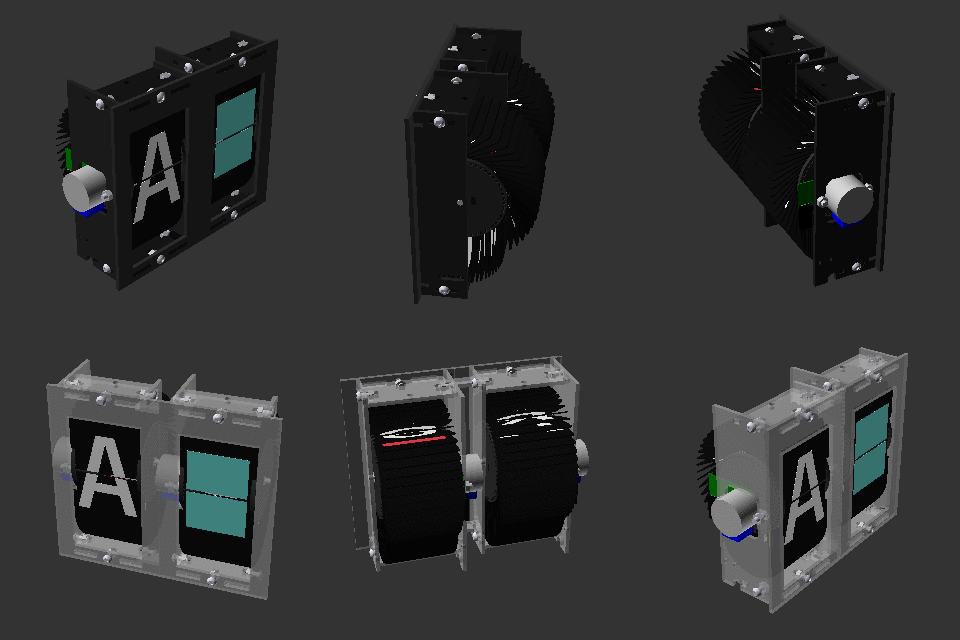
Source view and main parts

Check the source ↗
Split-Flap DisplaySplit-Flap Display · Scott Bezek ↗
PHYSICAL BUILD6 key parts or groups
No.Source specification
013D printed module parts
02Custom PCB and electronics
03Stepper motor per module
04Printed character flaps
05Frame and power distribution
06Controller computer or microcontroller
Full source specifications
  1. 3D printed module parts
  2. Custom PCB and electronics
  3. Stepper motor per module
  4. Printed character flaps
  5. Frame and power distribution
  6. Controller computer or microcontroller
TOOLS / PROCESSES2 involved
  • Laser cutting
  • Soldering
The real-world workYOU STILL HAVE TOThe real-world work
  • Fabricate the repeated mechanical parts
  • Assemble and wire every display module
  • Fix mechanical alignment, friction and sensor positioning problems
  • Calibrate a large bank of modules so they behave consistently
THE BUILD SEQUENCE

How it comes together

1Preparation

  1. Decide the display size

    The module count drives printing, PCB ordering, flap fabrication, power and frame complexity, so choose the finished scale before ordering.

    YOU
  2. Make one complete module

    Print the mechanics, assemble the motor and sensor, build the electronics and prove one module before multiplying anything.

    YOU

2Build and assembly

  1. Produce the flaps

    Use the project fabrication guidance to create the physical character flaps. This repetitive production step is one of the most labour-heavy parts.

    YOU
  2. Scale electronics and mechanics

    Order or assemble the required PCBs, duplicate modules and build the supporting frame and power system.

    YOU

3Configure and test

  1. Configure the controller

    Set up addressing, character maps and software control. AI can help with integrations and content logic after the hardware is reliable.

    AI + YOU

Benchmark this project

Use the Split-Flap Display prompt. Compare what different models deliver, then add what happened when you tried it.

Try this benchmark
View the project prompt

CAIBI adaptation · Prompt 1.0 · Project source

Open and copy prompt →

Benchmark results 0

No reviewed results yet for Split-Flap Display. Add the first result →

AI IN THIS PROJECT

Get AI help on this build

CAIBI · AI CAN HELP

AI can help with

  • Firmware help
  • Layout calculations
  • Debugging
CAIBI · AI CAN'T DO

You still need to

  • Fabricate the repeated mechanical parts
  • Assemble and wire every display module
  • Fix mechanical alignment, friction and sensor positioning problems
  • Calibrate a large bank of modules so they behave consistently
Original source AI use and prompts
SOURCEThe original project does not publish an AI prompt

The prompts below are CAIBI helpers for this build. They are not presented as instructions from the creator.

CAIBI STARTING PROMPTS

Copy a prompt for this build

Each prompt tells AI to keep the original project source as the reference and to flag anything you must verify on the real build.

Ways to take it further
AFTER THE FIRST BUILD

Ways to take it further

Different module countsCustom flap artworkClock or transit dataMessage displayAlternative frame materials
More routes and resources
OTHER WAYS TO GET THERE

You do not have to follow one route.

REVIEWED RESOURCES

Useful places beyond the main source

SOURCE · CAIBI · BUILDERS

What supports the verdict

SOURCEScott Bezek

Long-running open source project with detailed fabrication documentation

Open source ↗
CAIBIBUILD FOR THE EXPERIENCE

A physical display with sound, motion and presence that software cannot reproduce. It makes most sense when the mechanism itself is part of the appeal.

Evidence: Strong

Leave a build review
HAVE YOU MADE THIS?

Leave a build review.

First-hand evidence improves the assessment
What we want to know

What happened when you actually tried to make it.

  • Did it work?
  • Actual time and cost
  • What did you change?
  • What was harder than the source suggested?
  • Would you build it again?