

Workshop dust trend display
A local display of particulate trends in a workshop, with honest sensor and measurement limits.
A staged completion guide and prompts. The parts and finished result still need physical validation.
Share your build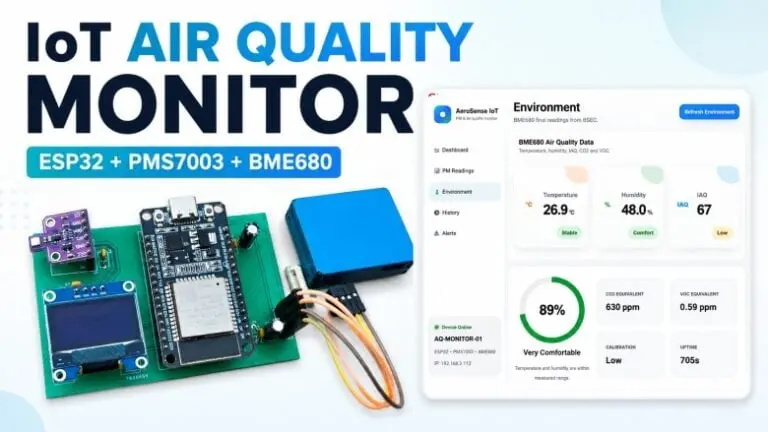
What you will work towards
See how particulate readings change during workshop activities.
CAIBI’s proposed addition: Check the sensor claims; design airflow and compare repeatable measurements.
Guide version 1.0. AI can help explain, adapt and debug; you still measure, assemble and test the physical result.
Start with the original
Tutorial foundation
Primary tutorial read; hardware and current dependency compatibility untested
Parts to confirm before buying
- ESP32 and PMS7003 particulate sensor from the source
- Compatible OLED and the optional environmental sensor
- A correctly rated supply and documented logic-level wiring
- Airflow-aware enclosure with accessible sensor inlet/outlet
Use the source wiring and bill of materials as the starting point. Confirm exact variants, availability, tools and complete cost before ordering.
The completion route
- Run the particulate sensor alone and identify the exact units and particle metrics it returns.
- Add the display, warm-up indication, rolling trends and disconnected-sensor state.
- Compare readings in ordinary conditions without deliberately generating hazardous dust.
- Design a case that preserves airflow and repeat a side-by-side enclosure comparison.
Prompts to move it forward
Copy a prompt into your AI tool with the source material and your actual parts. Work through one small step at a time and check the output before using it. Choose an AI tool or practise the skills first.
Check the source before buying
Review the source material I supply for Workshop dust trend display. Make a table of what is provided, missing, contradictory or dependent on a paid service. Identify exact hardware revisions, firmware files, library versions, CAD files and licences. Separate creator claims from your proposed additions. Do not fill gaps with guessed specifications. Finish with one small test that can resolve the biggest uncertainty before I buy parts.

Sources:
How To Electronics: https://how2electronics.com/iot-based-pm-air-quality-monitoring-system-using-esp32/
Plan the next step
Adapt the linked PMS7003 project to show particulate readings, units, warm-up state, stale data and a simple trend. Keep BME680 gas resistance or derived estimates distinct from measured CO2. Do not claim calibrated AQI, occupational compliance or safe air without the required method and evidence.

Sources:
How To Electronics: https://how2electronics.com/iot-based-pm-air-quality-monitoring-system-using-esp32/
Design a measured enclosure
Ask for the particulate sensor's inlet/outlet requirements and measured component dimensions. Keep airflow paths clear, isolate electronics heat where possible and make the sensor removable for maintenance. Explain how the case could bias readings.

Sources:
How To Electronics: https://how2electronics.com/iot-based-pm-air-quality-monitoring-system-using-esp32/
Check and document the result
Create a test log for Workshop dust trend display. Intended outcome: See how particulate readings change during workshop activities. Separate expected behaviour from observed results. Include power restart, disconnected inputs, communication failure and the actual physical use. Ask me to provide results, firmware versions, changes, photos and unresolved problems. Never mark a test passed without my evidence.

Sources:
How To Electronics: https://how2electronics.com/iot-based-pm-air-quality-monitoring-system-using-esp32/
What to test and record
- Disconnect the sensor and verify an explicit unavailable state.
- Record warm-up behaviour and a quiet baseline.
- Compare open-bench and enclosed readings under the same conditions.
- Check timestamps and units on saved or displayed readings.
Keep photos, exact parts and software versions with the test log. Failed or incomplete attempts are useful evidence too.
A possible next version
Compare with an appropriate reference instrument before drawing stronger conclusions from the numbers.
What builders are contributing
Suggest something useful, improve a route or share what you made. Contributions are reviewed before publication. Community builds remain attributed to their builders.
Loading reviewed contributions…