

Room comfort display
One desk screen showing temperature and humidity from two named rooms, with a last-seen time for each.
A staged completion guide and prompts. The parts and finished result still need physical validation.
Share your build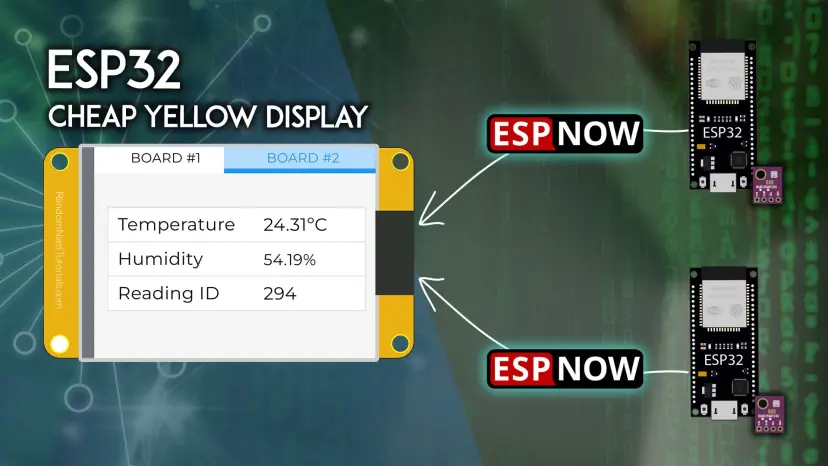
What you will work towards
See temperature and humidity from two rooms on one small screen.
CAIBI’s proposed addition: Add room names, last-seen times, sensor placement guidance and vented cases.
Guide version 1.0. AI can help explain, adapt and debug; you still measure, assemble and test the physical result.
Start with the original
Tutorial foundation
Primary tutorial read; hardware and current dependency compatibility untested
Parts to confirm before buying
- ESP32 CYD ESP32-2432S028R matching the source
- Two compatible ESP32 sensor nodes
- Two BME280 modules and appropriate low-voltage power
- Vented sensor cases and a measured display stand
Use the source wiring and bill of materials as the starting point. Confirm exact variants, availability, tools and complete cost before ordering.
The completion route
- Reproduce one sender and the receiving screen before adding a second node.
- Assign fixed node IDs and room names. Validate incoming packet length and format; display stale or missing readings separately.
- Place sensors away from hot boards, sun and draughts. Compare both side by side before moving them to separate rooms.
- Make ventilated node cases and a stand that leaves USB and reset access available.
Prompts to move it forward
Copy a prompt into your AI tool with the source material and your actual parts. Work through one small step at a time and check the output before using it. Choose an AI tool or practise the skills first.
Check the source before buying
Review the source material I supply for Room comfort display. Make a table of what is provided, missing, contradictory or dependent on a paid service. Identify exact hardware revisions, firmware files, library versions, CAD files and licences. Separate creator claims from your proposed additions. Do not fill gaps with guessed specifications. Finish with one small test that can resolve the biggest uncertainty before I buy parts.

Sources:
Random Nerd Tutorials: https://randomnerdtutorials.com/esp32-cyd-esp-now-receive-data/
Plan the next step
Adapt the source CYD ESP-NOW receiver for two named BME280 nodes. Validate packet size and schema before reading fields. Track per-node last-seen times, show disconnected data clearly and preserve room names. Use callback signatures matching my installed ESP32 core. Do not label BME280 values as CO2 or air quality.

Sources:
Random Nerd Tutorials: https://randomnerdtutorials.com/esp32-cyd-esp-now-receive-data/
Design a measured enclosure
Ask for measured CYD and sensor-board dimensions. Design a stable display stand and two ventilated sensor cases. Separate the sensor from controller heat, keep antenna clearance and provide accessible USB and reset openings.

Sources:
Random Nerd Tutorials: https://randomnerdtutorials.com/esp32-cyd-esp-now-receive-data/
Check and document the result
Create a test log for Room comfort display. Intended outcome: See temperature and humidity from two rooms on one small screen. Separate expected behaviour from observed results. Include power restart, disconnected inputs, communication failure and the actual physical use. Ask me to provide results, firmware versions, changes, photos and unresolved problems. Never mark a test passed without my evidence.

Sources:
Random Nerd Tutorials: https://randomnerdtutorials.com/esp32-cyd-esp-now-receive-data/
What to test and record
- Compare the two sensors in the same location and record their difference.
- Unplug one node and confirm only its reading becomes stale.
- Restart the screen and both nodes in different orders.
- Check readability from the intended viewing distance.
Keep photos, exact parts and software versions with the test log. Failed or incomplete attempts are useful evidence too.
A possible next version
Add history or Home Assistant integration after the two-room display behaves reliably.
What builders are contributing
Suggest something useful, improve a route or share what you made. Contributions are reviewed before publication. Community builds remain attributed to their builders.
Loading reviewed contributions…