

Desk status lamp
A small USB-powered pixel lamp with three manually selected states. Live calendar integration is a later extension.
A staged completion guide and prompts. The parts and finished result still need physical validation.
Share your build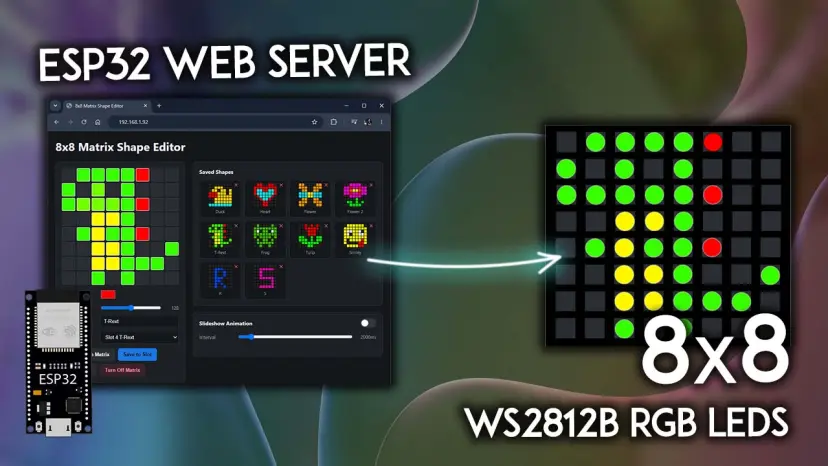
What you will work towards
Show focus, availability or a simple countdown as clear pixel icons.
CAIBI’s proposed addition: Choose the states and controls; add a diffuser, enclosure and reliable power.
Guide version 1.0. AI can help explain, adapt and debug; you still measure, assemble and test the physical result.
Start with the original
Tutorial foundation
Primary tutorial read; hardware and current dependency compatibility untested
Parts to confirm before buying
- ESP32 development board supported by the source
- 8×8 WS2812B matrix matching the tutorial
- Correctly rated low-voltage supply and wiring; confirm the matrix demand
- Optional physical button, diffuser, fixings and measured enclosure
Use the source wiring and bill of materials as the starting point. Confirm exact variants, availability, tools and complete cost before ordering.
The completion route
- Run the source shape editor on the bench and save three recognisable icons. Record the exact board and dependency versions that worked.
- Add a small state selector. Start with manual Focus, Available and Away controls, a brightness limit and a dim boot state.
- Measure the assembled matrix, board, connectors and cable bend. Print a shallow frame with a removable back and separate diffuser.
- Test the enclosed unit, including power recovery and the brightness you actually intend to use.
Prompts to move it forward
Copy a prompt into your AI tool with the source material and your actual parts. Work through one small step at a time and check the output before using it. Choose an AI tool or practise the skills first.
Check the source before buying
Review the source material I supply for Desk status lamp. Make a table of what is provided, missing, contradictory or dependent on a paid service. Identify exact hardware revisions, firmware files, library versions, CAD files and licences. Separate creator claims from your proposed additions. Do not fill gaps with guessed specifications. Finish with one small test that can resolve the biggest uncertainty before I buy parts.

Sources:
Random Nerd Tutorials: https://randomnerdtutorials.com/esp32-8x8-matrix-shape-editor-web-server/
Plan the next step
Extend the linked matrix shape editor into a three-state desk lamp. Keep the original pixel editor available. Define manual Focus, Available and Away states, saved brightness, a conservative startup level and an explicit offline state. Ask which board and matrix I have before selecting pins. Separate any later calendar API into a replaceable adapter.

Sources:
Random Nerd Tutorials: https://randomnerdtutorials.com/esp32-8x8-matrix-shape-editor-web-server/
Design a measured enclosure
Design a desktop frame for my measured 8×8 matrix, controller and USB connector. Ask for all dimensions, hole positions, diffuser thickness, wire clearance and intended print orientation. Provide a removable back, cable strain relief and enough separation to avoid visible LED hotspots. Do not guess board dimensions.

Sources:
Random Nerd Tutorials: https://randomnerdtutorials.com/esp32-8x8-matrix-shape-editor-web-server/
Check and document the result
Create a test log for Desk status lamp. Intended outcome: Show focus, availability or a simple countdown as clear pixel icons. Separate expected behaviour from observed results. Include power restart, disconnected inputs, communication failure and the actual physical use. Ask me to provide results, firmware versions, changes, photos and unresolved problems. Never mark a test passed without my evidence.

Sources:
Random Nerd Tutorials: https://randomnerdtutorials.com/esp32-8x8-matrix-shape-editor-web-server/
What to test and record
- Save each icon, restart and confirm the selected boot behaviour.
- Disconnect Wi-Fi and show a clear local/manual state.
- Run at the intended maximum brightness and check supply stability and temperature.
- Confirm the diffuser remains legible at normal desk distance.
Keep photos, exact parts and software versions with the test log. Failed or incomplete attempts are useful evidence too.
A possible next version
Only after the manual lamp works: connect one calendar or focus application and show stale data explicitly.
What builders are contributing
Suggest something useful, improve a route or share what you made. Contributions are reviewed before publication. Community builds remain attributed to their builders.
Loading reviewed contributions…