

Internet radio with physical controls
A mains-adapter-powered desk radio with a few working presets and usable physical volume controls.
A staged completion guide and prompts. The parts and finished result still need physical validation.
Share your build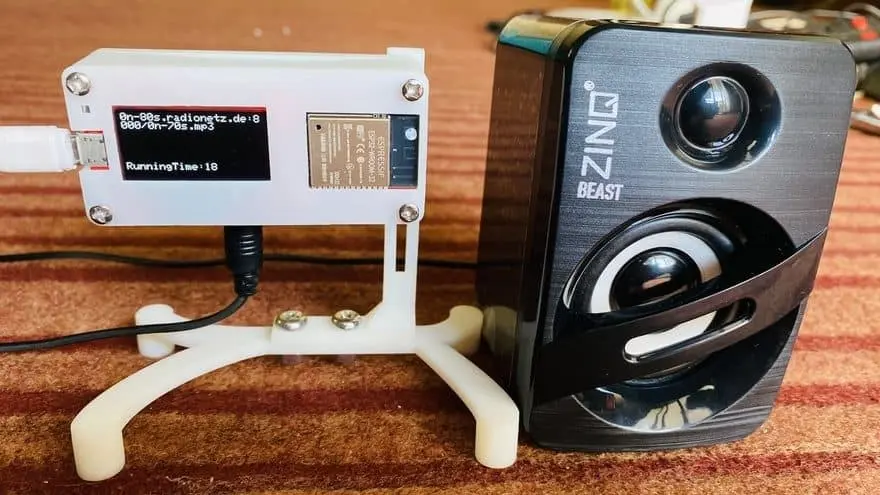
What you will work towards
Listen to a few favourite stations without opening an app.
CAIBI’s proposed addition: Verify playable stream URLs, add presets and volume controls, then design the speaker case.
Guide version 1.0. AI can help explain, adapt and debug; you still measure, assemble and test the physical result.
Start with the original
Tutorial foundation
Tutorial located; parts, current dependencies and physical results have not been tested by CAIBI.
Parts to confirm before buying
- ESP32/audio hardware matching the source configuration
- Compatible audio DAC/amplifier and speaker as specified by the source
- OLED, buttons or encoder and protected low-voltage power
- Measured speaker enclosure and fixings
Use the source wiring and bill of materials as the starting point. Confirm exact variants, availability, tools and complete cost before ordering.
The completion route
- Confirm that one current stream plays using the documented hardware and library versions.
- Add three verified presets, volume control and visible connecting/unavailable states.
- Bench-test the speaker and amplifier before designing a case; keep audio wiring away from noisy power routes.
- Make a serviceable enclosure and check controls, sound and reconnection at the intended volume.
Prompts to move it forward
Copy a prompt into your AI tool with the source material and your actual parts. Work through one small step at a time and check the output before using it. Choose an AI tool or practise the skills first.
Check the source before buying
Review the source material I supply for Internet radio with physical controls. Make a table of what is provided, missing, contradictory or dependent on a paid service. Identify exact hardware revisions, firmware files, library versions, CAD files and licences. Separate creator claims from your proposed additions. Do not fill gaps with guessed specifications. Finish with one small test that can resolve the biggest uncertainty before I buy parts.

Sources:
How To Electronics: https://how2electronics.com/simple-esp32-internet-web-radio-with-oled-display/
Plan the next step
Build on the linked ESP32 radio tutorial. Ask for my ESP32 variant, audio board, library versions and three stream URLs. Check codec support rather than assuming any website URL is playable. Add presets, bounded reconnects, remembered volume with a conservative startup limit and non-blocking buttons.

Sources:
How To Electronics: https://how2electronics.com/simple-esp32-internet-web-radio-with-oled-display/
Design a measured enclosure
Ask for measured speaker, amplifier, ESP32, OLED and control dimensions. Design a serviceable desk case with suitable speaker mounting, connector access and separation of audio and power wiring. Do not invent acoustic performance claims.

Sources:
How To Electronics: https://how2electronics.com/simple-esp32-internet-web-radio-with-oled-display/
Check and document the result
Create a test log for Internet radio with physical controls. Intended outcome: Listen to a few favourite stations without opening an app. Separate expected behaviour from observed results. Include power restart, disconnected inputs, communication failure and the actual physical use. Ask me to provide results, firmware versions, changes, photos and unresolved problems. Never mark a test passed without my evidence.

Sources:
How To Electronics: https://how2electronics.com/simple-esp32-internet-web-radio-with-oled-display/
What to test and record
- Play every preset and record its source URL and date checked.
- Unplug and reconnect the network; controls should remain responsive.
- Restart at a high saved volume and verify the startup limit.
- Check speaker temperature and audible noise at the intended level.
Keep photos, exact parts and software versions with the test log. Failed or incomplete attempts are useful evidence too.
A possible next version
Add station search or network playback after the physical radio is dependable.
What builders are contributing
Suggest something useful, improve a route or share what you made. Contributions are reviewed before publication. Community builds remain attributed to their builders.
Loading reviewed contributions…