RECENTLY CHECKED
All projects →
CAIBI ASSESSMENT

Zynthian V5.1

CAIBI VERDICTBUILD IT

An open Raspberry Pi 5 music workstation and synthesizer platform available as a documented DIY kit, combining audio I/O, MIDI, touchscreen control, sequencing, sampling, effects and open software.

Build or buy?

Compare the documented build with the purchase reference.

Build it yourself

Known parts cost£339Build total not establishedBase kit only; VAT, Raspberry Pi, PSU and storage extra
Time
1 to 3 hours assembly
Difficulty
2/5
Physical processes
Raspberry Pi 5 · Audio · MIDI · Linux
See build requirements →

Purchase reference

Buy price referencePrice not checkedNo priced alternative recorded

Check the source for the exact model, availability and what is included.

Check comparison evidence →
Purchase comparison not yet priced
What the prices cover

Official €395 base-kit price converted for planning. VAT, Raspberry Pi 5/PSU choices and microSD can add materially.

Includes: Official base kit.

Not included: VAT where applicable; Raspberry Pi 5 option; PSU option; microSD and shipping.

Build evidence recorded 4 Sep 2026. Currency conversions are approximate.

Zynthian is an open multi-engine instrument and software platform. Commercial keyboards and modules vary too much in engines, controls and openness for a single price difference to be honest.

BUILD AT A GLANCE

Source view and main parts

Check the source ↗
Zynthian V5.1Zynthian V5.1 · Zynthian ↗
PHYSICAL BUILD10 key parts or groups
No.Source specification
01Zynthian V5.1 black anodised aluminium case
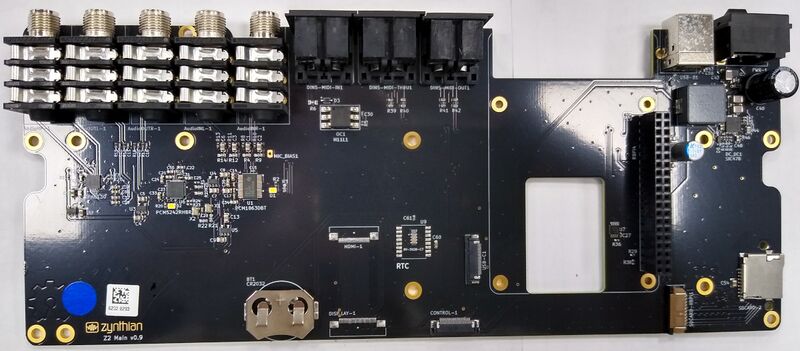
02Zynthian V5.1 main board
03Control board with silicone keypad and four machined aluminium knobs
045-inch DSI capacitive touchscreen
05Raspberry Pi 5
06Thermal block and thermal pad
07Display
0824 V 1.5 A PSU where selected
09Good-quality microSD card of at least 32 GB
10Optional CR2032 RTC battery
Full source specifications
  1. Zynthian V5.1 black anodised aluminium case
  2. Zynthian V5.1 main board
  3. Control board with silicone keypad and four machined aluminium knobs
  4. 5-inch DSI capacitive touchscreen
  5. Raspberry Pi 5, selected separately from the base kit where required
  6. Thermal block and thermal pad
  7. Display, control, USB-C and microSD flat-cable assemblies
  8. 24 V 1.5 A PSU where selected
  9. Good-quality microSD card of at least 32 GB, not included in the kit
  10. Optional CR2032 RTC battery
TOOLS / PROCESSES4 involved
  • Raspberry Pi 5
  • Audio
  • MIDI
  • Linux
The real-world workYOU STILL HAVE TOThe real-world work
  • Fit thermal pads
  • Mount Raspberry Pi and boards
  • Connect delicate ribbon cables
  • Prepare microSD
  • Connect and verify real audio and MIDI hardware
THE BUILD SEQUENCE

How it comes together

1Preparation

  1. Choose the actual kit configuration

    Start from the current V5.1 shop listing and account for the options rather than treating the base €395 price as a complete all-in cost. Confirm whether Raspberry Pi 5 and PSU are included in the chosen configuration and supply a suitable microSD card separately.

    AI + YOU
  2. Prepare the thermal block carefully

    Measure and cut the published thermal-pad pieces, then place them on the correct Raspberry Pi 5 contact areas before mounting the thermal block. This is simple work but dimensions and placement matter to cooling.

    YOU
  3. Build the lower electronics assembly

    Fit the Raspberry Pi 5, main board, microSD adapter and related hardware into the aluminium base using the documented screws and spacers. Do not force connectors or board alignment.

    YOU

2Build and assembly

  1. Build the control and display section

    Mount the control board, silicone keypad, touchscreen and spacers in the top case. Leave the display slightly loose until the final case alignment step as instructed by the source.

    YOU
  2. Join the assemblies with the flat cables

    Connect the display and control ribbon cables in the documented orientation, checking connector contact direction and any board-revision warnings. Builder reports consistently identify these small FPC connectors as the fiddliest part.

    YOU

3Configure and test

  1. Prepare ZynthianOS and prove first boot

    Write the current ZynthianOS image to a good-quality microSD card, boot the assembled unit and allow the first configuration cycle to finish. If it fails, verify the SD card and physical connections before changing software.

    AI + YOU
  2. Configure the instrument around the real setup

    After the stock unit works, configure audio, MIDI, synth engines, sampler, effects, sequencing and controller behaviour for the actual instruments and workflow. AI can help interpret configuration and source code, but the builder must verify real audio levels, latency and MIDI behaviour.

    AI + YOU

Benchmark this project

Use the Zynthian V5.1 prompt. Compare what different models deliver, then add what happened when you tried it.

Try this benchmark
View the project prompt

CAIBI adaptation · Prompt 1.0 · Project source

Open and copy prompt →

Benchmark results 0

No reviewed results yet for Zynthian V5.1. Add the first result →

AI IN THIS PROJECT

Get AI help on this build

CAIBI · AI CAN HELP

AI can help with

  • ZynthianOS troubleshooting
  • MIDI and audio routing help
  • Configuration planning
  • Python and integration work
  • Custom workflow investigation
CAIBI · AI CAN'T DO

You still need to

  • Fit thermal pads
  • Mount Raspberry Pi and boards
  • Connect delicate ribbon cables
  • Prepare microSD
  • Connect and verify real audio and MIDI hardware
Original source AI use and prompts
SOURCEThe original project does not publish an AI prompt

The prompts below are CAIBI helpers for this build. They are not presented as instructions from the creator.

CAIBI STARTING PROMPTS

Copy a prompt for this build

Each prompt tells AI to keep the original project source as the reference and to flag anything you must verify on the real build.

Ways to take it further
AFTER THE FIRST BUILD

Ways to take it further

Custom Raspberry Pi-based build rather than official caseCustom MIDI controller mappingsAlternative synth engines and effects chainsSampler and looper workflowsPython or OSC integrationsCustom control hardware using published open hardware information
More routes and resources
OTHER WAYS TO GET THERE

You do not have to follow one route.

REVIEWED RESOURCES

Useful places beyond the main source

SOURCE · CAIBI · BUILDERS

What supports the verdict

SOURCEZynthian

Current Zynthian V5.1 DIY kit, shop listing, assembly guide and active open-source software/hardware ecosystem verified. Multiple first-hand builders corroborate the official one-to-three-hour assembly range and identify ribbon cables, thermal-pad preparation and first boot as the main practical catches.

Open source ↗
CAIBIBUILD IT

Unlike many DIY instruments, the current official route gives you a substantial finished music workstation without requiring PCB fabrication or soldering. AI becomes useful after assembly for configuration, MIDI routing, software investigation, scripting and adapting an unusually open audio platform.

Evidence: Strong

Leave a build review
HAVE YOU MADE THIS?

Leave a build review.

First-hand evidence improves the assessment
What we want to know

What happened when you actually tried to make it.

  • Did it work?
  • Actual time and cost
  • What did you change?
  • What was harder than the source suggested?
  • Would you build it again?